

Skip to content
  • AI
  • Solutions
    • Sell Booths & Sponsorships
    • Interactive Floor Plans
    • Sponsor Fulfillment Automation
    • Invoicing & Payments
    • Lead Scanning & ROI
  • Industries
    • Healthcare & Life Sciences
    • Retail, Food & Hospitality
    • Education & Credentialing
    • Engineering & Trade
    • AMCs & Agencies
  • Customers
  • Pricing
  • Book a Demo

Book a Demo!

Fill out the form and a rep will be in touch ASAP

Edit Content

Home

  • Available Integrations

Cvent

  • Obtaining API Credentials for Cvent Integration and Establishing a Connection between Cvent and ExpoGenie
  • Making Cvent Developer Account
  • How to Configure Cvent Integration
    • Making Cvent Developer Account
    • Obtaining API Credentials for Cvent Integration and Establishing a Connection between Cvent and ExpoGenie
    • Setting up Data Flow from Cvent to ExpoGenie
    • Setting up Data Flow from ExpoGenie to Cvent
    • How does the filter work in Expo-Genie?
    • How does mapping work in ExpoGenie?
    • How does the Execution Sequence work in Expo-Genie?
  • Integration History
    • Viewing Integration History in ExpoGenie
    • Viewing Integration History in Cvent
  • Error Codes
    • Error Codes

Webhook

  • User Created In ExpoGenie
  • User Updated In ExpoGenie
  • Task Updated In ExpoGenie

Zapier

  • Booth Staff Updated Trigger
  • New Booth Staff Created Trigger
  • New Invoice Created Trigger
  • Invoice Updated Trigger

Novi

  • ExpoGenie Integration With QuickBooks
  • ExpoGenie Integration With Novi SSO
View Categories

How does the filter work in Expo-Genie?

Purpose:

  • Filters within integration flows serve to selectively control the data that passes from Cvent to Expo-Genie.
  • They ensure that only data meeting specific criteria is transferred, enhancing data quality and relevance.

Types of Filters:

  • Field Equality: Allows data to pass only when a designated field holds a specific value.
  • Field Inequality: Permits data to pass only when a designated field does not hold a particular value.

Multiple Filter Application:

  • You can implement multiple filters within a single integration flow.
  • Data must successfully meet the conditions of all applied filters to be transferred.
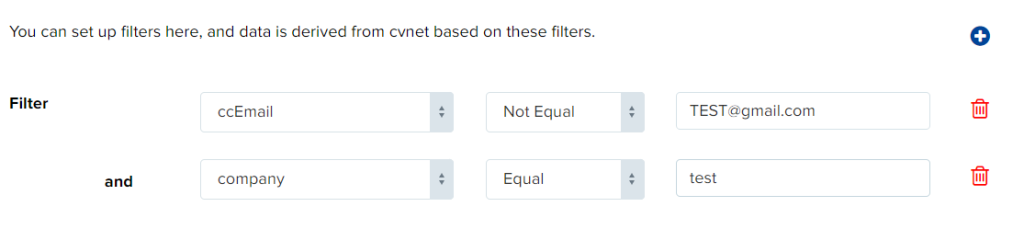
Example:

To transfer only attendee records from Cvent where the registration status is “Confirmed,” you’d create a filter with the following configuration:

Field: Registration Status

Condition: Equal to

Value: test

Updated on August 13, 2024
Setting up Data Flow from ExpoGenie to CventHow does mapping work in ExpoGenie?

Want to receive news and updates?

1900 South Norfolk St
Suite 350
San Mateo, CA 94403
888-693-1208

  • ChatGPT ChatGPT
  • LinkedIn
  • G2 Reviews
Features
  • Sponsor Sales & Reg
  • Interactive Floor Plan
  • Sponsor Fulfillment
  • Invoices & Billing
  • Lead Scanning
Resources
  • Integrations
  • Try the Platform
  • Blog
  • Choosing the Right Platform
  • Intake Form
  • API Documentation
Company
  • FAQs
  • Pricing
  • Contact us
Security
  • Terms & Conditions
  • Privacy Policy
  • Security & PCI FAQ

Copyright © ExpoGenie Inc. All rights reserved 2025