

Skip to content
  • AI
  • Solutions
    • Sell Booths & Sponsorships
    • Interactive Floor Plans
    • Sponsor Fulfillment Automation
    • Invoicing & Payments
    • Lead Scanning & ROI
  • Industries
    • Healthcare & Life Sciences
    • Retail, Food & Hospitality
    • Education & Credentialing
    • Engineering & Trade
    • AMCs & Agencies
  • Customers
  • Pricing
  • Book a Demo

Book a Demo!

Fill out the form and a rep will be in touch ASAP

Edit Content

Home

  • Available Integrations

Cvent

  • Obtaining API Credentials for Cvent Integration and Establishing a Connection between Cvent and ExpoGenie
  • Making Cvent Developer Account
  • How to Configure Cvent Integration
    • Making Cvent Developer Account
    • Obtaining API Credentials for Cvent Integration and Establishing a Connection between Cvent and ExpoGenie
    • Setting up Data Flow from Cvent to ExpoGenie
    • Setting up Data Flow from ExpoGenie to Cvent
    • How does the filter work in Expo-Genie?
    • How does mapping work in ExpoGenie?
    • How does the Execution Sequence work in Expo-Genie?
  • Integration History
    • Viewing Integration History in ExpoGenie
    • Viewing Integration History in Cvent
  • Error Codes
    • Error Codes

Webhook

  • User Created In ExpoGenie
  • User Updated In ExpoGenie
  • Task Updated In ExpoGenie

Zapier

  • Booth Staff Updated Trigger
  • New Booth Staff Created Trigger
  • New Invoice Created Trigger
  • Invoice Updated Trigger

Novi

  • ExpoGenie Integration With QuickBooks
  • ExpoGenie Integration With Novi SSO
View Categories

Setting up Data Flow from ExpoGenie to Cvent

Verify Client Credentials:

  • Ensure that the Client ID and Client Secret have been successfully connected as outlined in the previous steps.

Create Integration Flow:

  • Initiate the creation of a new Integration Flow.
  • Designate Expo-Genie as the Source and Cvent as the Destination within the Flow.
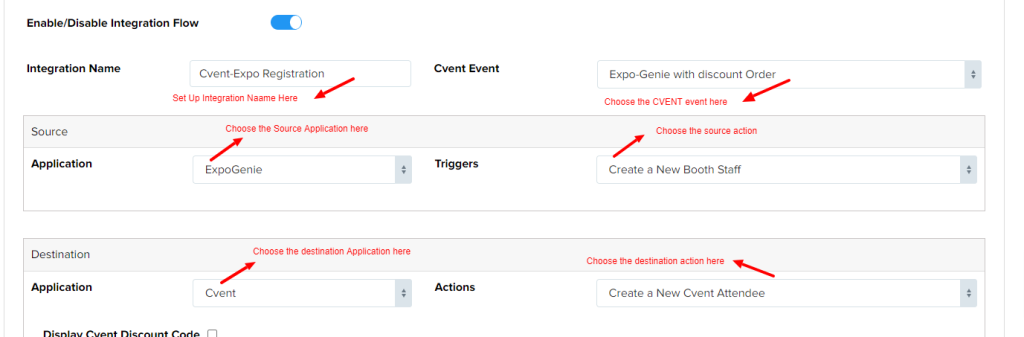
Establish Field Mappings:

  • Carefully align the fields from the booth staff module in Expo-Genie with the corresponding fields within Cvent.
  • This mapping ensures accurate data transfer between the two platforms.

Upon completion of these steps, any updates made to booth staff information within Expo-Genie will be seamlessly reflected within Cvent.

Updated on September 19, 2024
Setting up Data Flow from Cvent to ExpoGenieHow does the filter work in Expo-Genie?

Want to receive news and updates?

1900 South Norfolk St
Suite 350
San Mateo, CA 94403
888-693-1208

  • ChatGPT ChatGPT
  • LinkedIn
  • G2 Reviews
Features
  • Sponsor Sales & Reg
  • Interactive Floor Plan
  • Sponsor Fulfillment
  • Invoices & Billing
  • Lead Scanning
Resources
  • Integrations
  • Try the Platform
  • Blog
  • Choosing the Right Platform
  • Intake Form
  • API Documentation
Company
  • FAQs
  • Pricing
  • Contact us
Security
  • Terms & Conditions
  • Privacy Policy
  • Security & PCI FAQ

Copyright © ExpoGenie Inc. All rights reserved 2025