
















































EMBEDDED EXHIBITOR INSURANCE

Make Exhibitor Insurance One Less Thing to Chase.

Add insurance to the exhibitor checklist, let each company upload existing coverage or purchase an eligible policy without leaving ExpoGenie, and track every certificate and requirement from one place.

A simpler insurance experience for exhibitors. Better visibility for your team.

1,000+events run annually
100,000+planners & exhibitors served
Insurance requirement addedVisible in the exhibitor checklist
Coverage submittedUploaded or purchased
Status trackedReady for organizer review
100+ hours saved
Trusted by leading associations and event organizers
THE OLD WAY

Certificates of insurance should not live in your inbox.

When insurance requirements are managed through email and spreadsheets, your team spends valuable time collecting documents, checking statuses, following up, and preparing for last-minute exceptions.

Manual certificate collection

Your team emails every exhibitor, downloads each certificate, and files it somewhere for later.

Incomplete or insufficient coverage

Submitted documents may be missing required limits, dates, insured names, or certificate-holder information.

No response from exhibitors

Some companies do not complete the requirement until your team follows up repeatedly.

Last-minute submissions

Certificates and corrections arrive in the final days before move-in.

Documents stored everywhere

Policies and certificates are scattered across email threads, folders, forms, and spreadsheets.

No clear event-wide status

It is difficult to see which exhibitors have submitted coverage and which still need attention.

Your team needs a clear insurance workflow, not another collection of attachments to reconcile before the event.

THE NEW WAY

Build insurance into the exhibitor workflow.

Give every exhibitor a clear requirement, an easy way to complete it, and one place where your team can track the result.

Two ways to complete the requirement

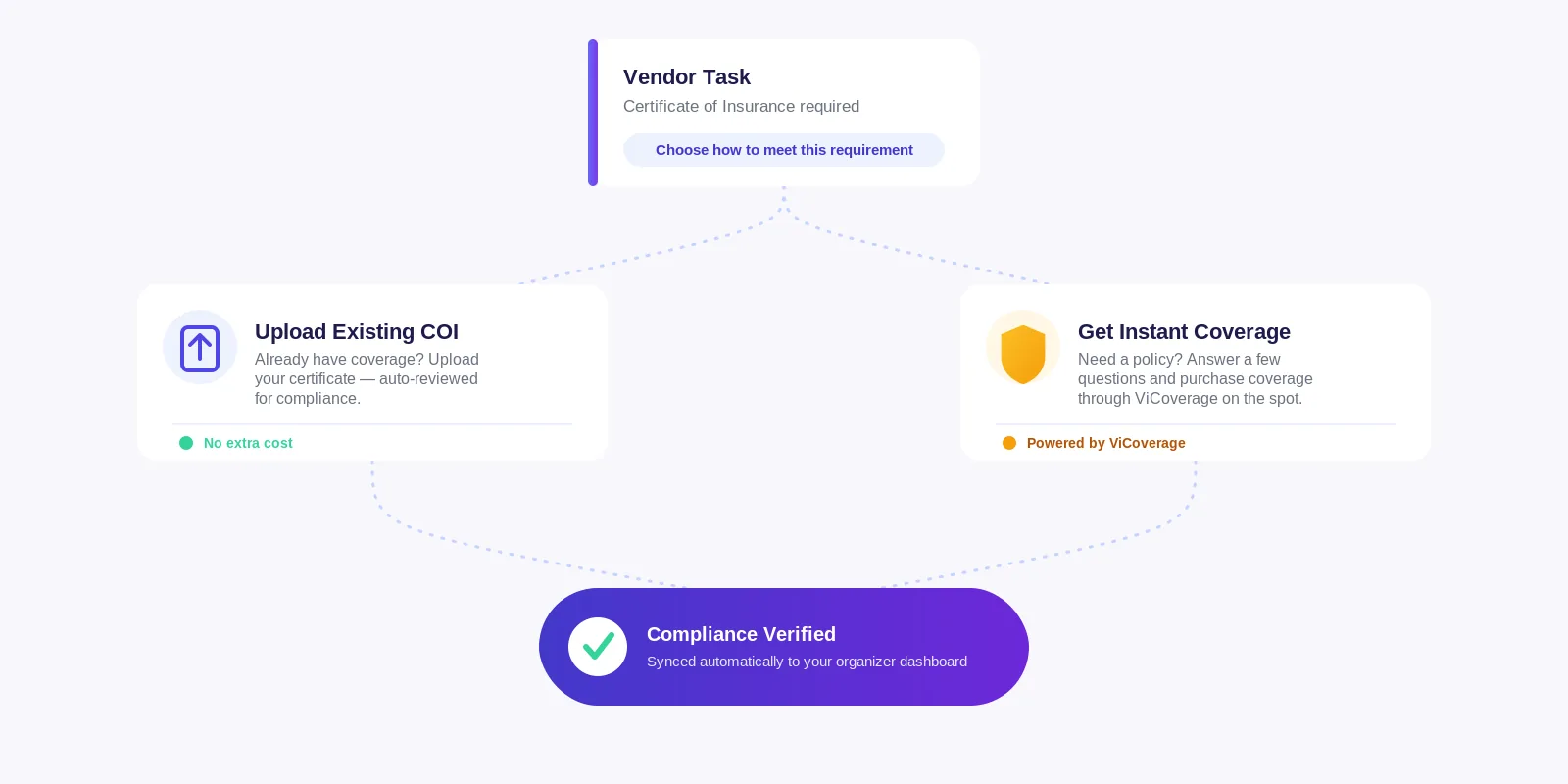
Exhibitors can upload an existing certificate or purchase eligible coverage through the embedded experience.

Less manual collection

Certificates and insurance status stay connected to the exhibitor account instead of being buried in email.

Better event-wide visibility

Your team can identify completed, outstanding, and exception statuses from one organized workflow.

SEE IT IN ACTION

One requirement. Two simple ways to complete it.

ORGANIZER SETUP

Configure the insurance requirement for your event.

Choose how insurance should appear in the exhibitor workflow and provide the coverage instructions, limits, dates, and certificate information exhibitors need to complete the requirement. Set the requirement once, then make it available across the applicable exhibitor accounts.

Requirement configured
BUILT-IN TASK

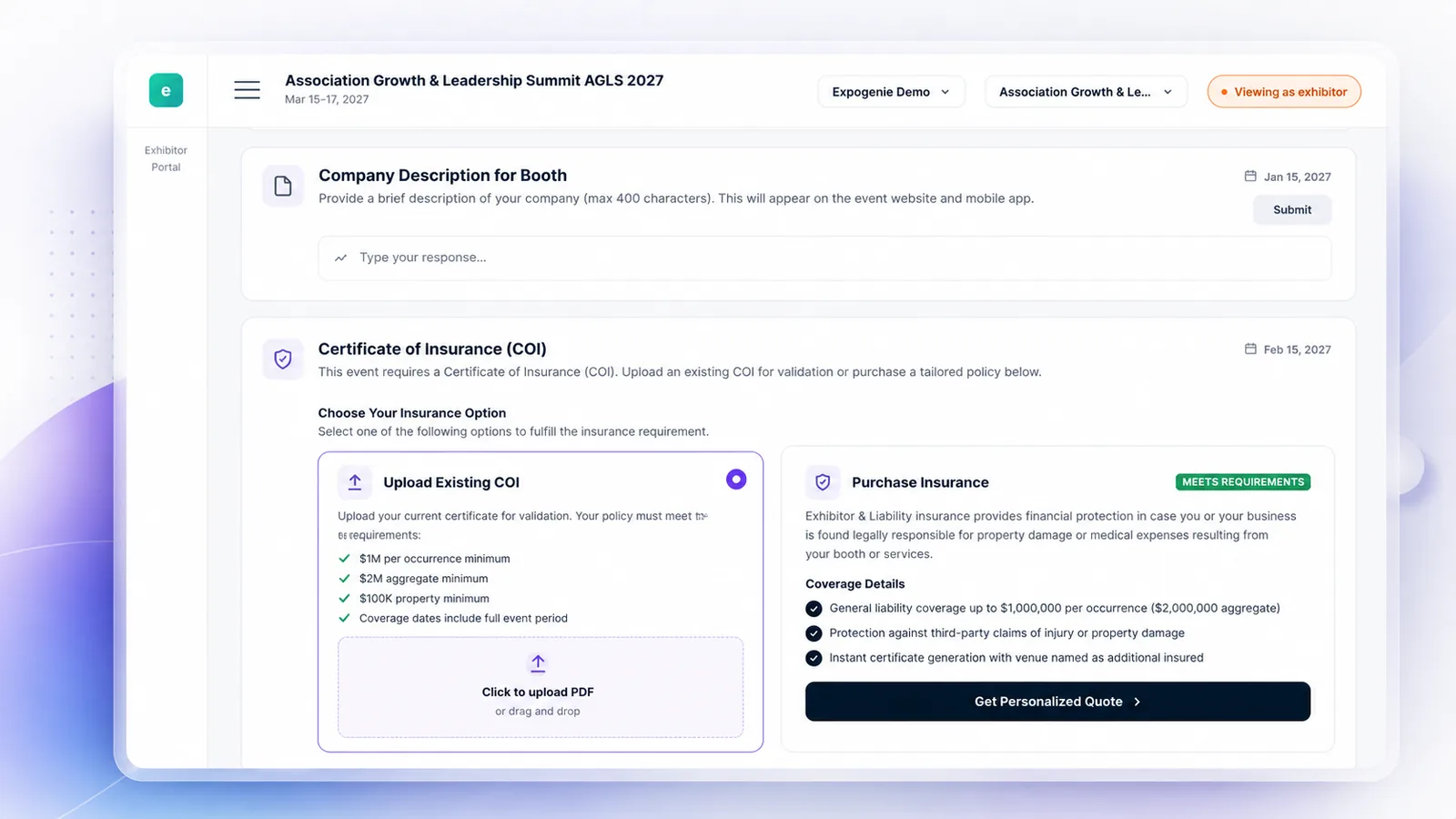
Put insurance directly on the exhibitor’s checklist.

Instead of sending a separate link or PDF, give exhibitors a clearly defined insurance task alongside the other requirements they are already completing in ExpoGenie. Instructions, deadlines, submission options, and status remain connected to the exhibitor account, so the requirement stays visible until it is completed or resolved.

Task added to checklist
UPLOAD AN EXISTING COI

Let exhibitors use coverage they already have.

Exhibitors that already carry appropriate insurance can upload their certificate directly through the task for verification against your event’s insurance requirements. Once approved, the certificate remains attached to the exhibitor record so its submission and status can be tracked alongside the rest of the event requirements.

COI uploaded
PURCHASE COVERAGE

Give eligible exhibitors a faster way to obtain coverage.

Exhibitors answer a few questions, review an available quote, and purchase coverage through the embedded insurance experience without leaving their ExpoGenie workflow. After purchase, the corresponding proof of insurance can be connected to the exhibitor account automatically. Available limits, pricing, eligibility, exclusions, and policy details are shown to the exhibitor before purchase.

Coverage purchased
CENTRALIZED RECORDS

Keep certificates connected to the exhibitor account.

Whether coverage is purchased through the embedded experience or an existing certificate is uploaded, your team gets one organized place to review submission status and locate the supporting document. No searching through email attachments when the event is approaching.

Certificate on file
INSURANCE STATUS

See which exhibitors are complete, and which need attention.

Track insurance activity across participating companies so your team can focus on missing submissions, exceptions, or documents that require additional action.

Status: needs attention
THE EXPOGENIE WAY

From insurance requirement to organized event record.

ExpoGenie puts the requirement, completion options, certificate, and status into one connected exhibitor workflow.

Configure the Requirement

Define how insurance should work for the event and provide the applicable instructions.

Add It to the Checklist

The insurance task appears within the exhibitor’s existing portal experience.

Choose a Path

The exhibitor uploads existing coverage or requests an embedded quote.

Submit or Purchase

The exhibitor provides its certificate or purchases an eligible policy.

Validate the Information

The submission is processed according to the applicable insurance and event requirements.

Resolve Exceptions

Missing or insufficient information can be identified for follow-up.

Track Completion

The certificate and status remain connected to the exhibitor record.

EMBEDDED INSURANCE PARTNER

Insurance built into the ExpoGenie experience.

ExpoGenie partners with ViCoverage, powered by Vertical Insure, to bring event-compliant liability insurance directly into the exhibitor workflow. Companies can purchase coverage without leaving the platform, while ViCoverage handles policy administration, certificates, claims, and customer support so your team doesn’t have to.

ViCoverage, powered by Vertical Insure

Insurance products are offered through licensed insurance providers and are subject to eligibility, availability, terms, conditions, limitations, and exclusions. Vertical Insure is the licensed insurance producer. Coverage is underwritten by Great American Insurance Group and certificates of insurance are issued by Next Wave Insurance Services.

Embedded experience
Exhibitors can review the available insurance option without being sent through a disconnected organizer workflow.
Proof of insurance connected
Purchased policy documentation can be associated with the exhibitor record.
Existing coverage supported
Companies can submit an existing certificate when they already have applicable insurance.
Clear organizer status
Event teams can track which exhibitors have completed the requirement and which still need attention.
ONE CONNECTED EXPERIENCE

Insurance becomes part of getting event-ready.

For event teams

Track insurance completion without maintaining a separate spreadsheet and attachment archive.

For the event record

Keep the requirement, submission, certificate, and status connected to the exhibiting company.

Questions

Questions event teams ask us.

Exhibitors complete the requirement inside their ExpoGenie checklist. They can upload an existing certificate or review an available embedded insurance option without leaving the workflow.

Yes. Exhibitors that already have applicable coverage can upload an existing certificate through the insurance task for processing according to the event’s requirements.

Organizers can configure insurance as part of the exhibitor workflow. Whether it applies to all exhibitors, selected exhibitor types, specific products, or individual companies depends on how you set it up for your event.

Not for exhibitors using the built-in workflow. Certificates are automatically connected to the exhibitor record, making it easy to track insurance compliance in one place. If a submitted certificate doesn’t meet your event’s requirements, your team can review and address that exception.

Available embedded policies are designed around configured event-insurance requirements. Eligibility, terms, exclusions, and limits still apply, and the applicable quote and policy documents govern what is covered.

Through ViCoverage, exhibitors have access to liability insurance with coverage limits of up to $1,000,000 per occurrence and $2,000,000 aggregate. Coverage details, pricing, and policy terms are clearly displayed before purchase so exhibitors know exactly what they’re buying.

Pricing depends on the event, duration, eligibility, and other underwriting factors. Eligible exhibitors see the available price before deciding whether to purchase.

Availability can vary by location, event, activity, and eligibility. The purchase experience confirms whether coverage is available for the specific exhibitor and event.

Yes. Events where alcohol is served may still be eligible for coverage. However, if purchasing coverage through ExpoGenie, the policy does not include liquor liability coverage. Exhibitors can review the available coverage, limits, and policy terms before purchasing.

No. Exhibitor liability insurance and the organizer’s own insurance program serve different purposes. Organizers should confirm their coverage requirements with their broker, legal counsel, or insurance adviser.

Policies are offered through ViCoverage, powered by Vertical Insure. Coverage is underwritten by Great American Insurance Group, and exhibitors receive their policy documents and purchase communications directly from ViCoverage.

If an exhibitor purchases insurance through ExpoGenie, they can file a claim with ViCoverage by logging in or creating an account at customers.vicoverage.com. From there, they can view their policy details and submit a claim.

If an exhibitor uses an existing insurance policy and uploads a certificate of insurance (COI), any claims should be filed directly with the insurance provider that issued that policy.

ViCoverage handles all questions related to insurance purchased through ExpoGenie, including coverage, policy documents, and claims. Exhibitors can contact the ViCoverage Support Team at support@vicoverage.com or log in or create an account at customers.vicoverage.com to view their policy, manage their coverage, or file a claim.

If an exhibitor uses an existing insurance policy from another provider, they should contact that insurance provider directly with any questions or claims.

EASY TO ENABLE

Add insurance to the workflow your exhibitors already use.

Configure the requirement for your event, make it available through the exhibitor checklist, and give your team one place to track completion.

Provide the applicable instructions, limits, dates, and certificate details.

Allow companies to upload existing coverage or purchase an eligible embedded policy.

Keep submissions and insurance status connected to the exhibitor account.

Take exhibitor insurance out of your inbox.

See how ExpoGenie can help you add insurance to the exhibitor checklist, support existing certificates and embedded purchases, and track completion across your event.