Turn the pricing strategy your team already uses into automated rules. Charge more for premium inventory, reward larger purchases, recognize member or partner rates, run time-based offers, and control discounts, without calculating every order by hand.
The right price. For the right buyer. On every order.
1,000+events run annually
100,000+planners & exhibitors served
Booth ReservedBooth A-114 · Acme Corp
Payment Complete$4,200 · paid via Stripe
Sponsorship AddedGold Package
100+ hours saved
Trusted by leading associations and event organizers
The Old Way
One flat price for everyone leaves money on the table.
Real event pricing is rarely one-size-fits-all. Premium locations cost more. Members get different rates. Larger purchases may earn discounts. Pricing changes over time. When those rules live in someone’s head, a PDF, or a spreadsheet, every order becomes an exception.
Premium inventory gets underpriced
Corner booths, islands, larger spaces, and other desirable locations shouldn’t necessarily sell for the same rate as standard inventory.
Volume pricing gets calculated by hand
Multi-booth or high-value purchases require someone to remember the discount and calculate it correctly.
Buyer-specific pricing lives somewhere else
Member, non-member, partner, returning exhibitor, and other rates get tracked in spreadsheets or manually quoted.
Pricing deadlines require someone to remember
Early-bird or time-sensitive rates depend on a person updating pricing at exactly the right moment.
Discounts are hard to control
Promotional pricing gets promised over email with little visibility into eligibility, expiration, or usage.
Every exception creates another manual decision
The more sophisticated your pricing strategy becomes, the harder it is to apply consistently across every order.
Your pricing strategy shouldn’t depend on someone remembering the rules.
WHAT YOU GET
Turn your pricing strategy into rules the system can enforce.
Three things change when your pricing logic lives in the system.
Capture the value of premium inventory
Automatically apply different pricing to corners, premium locations, larger spaces, or other inventory worth more to buyers.
Reward the buyers you want to reward
Create pricing for members, larger purchases, preferred groups, returning exhibitors, or other qualified buyers without manually calculating every order.
Keep pricing consistent
Define discounts and adjustments once so your sales strategy is applied consistently instead of negotiated differently from order to order.
See It In Action
Complex pricing rules. Simple checkout.
THE RULE BUILDER
Build pricing logic around the way your event actually sells.
Define conditions based on the product, booth, buyer, quantity, timing, or other supported criteria, then determine what should happen when those conditions are met.
ExpoGenie handles the logic behind the scenes so the buyer sees the price that applies to them.
Interactive preview
Pricing rule preview
Example rules for a sample event. Change any condition and watch the price rebuild itself.
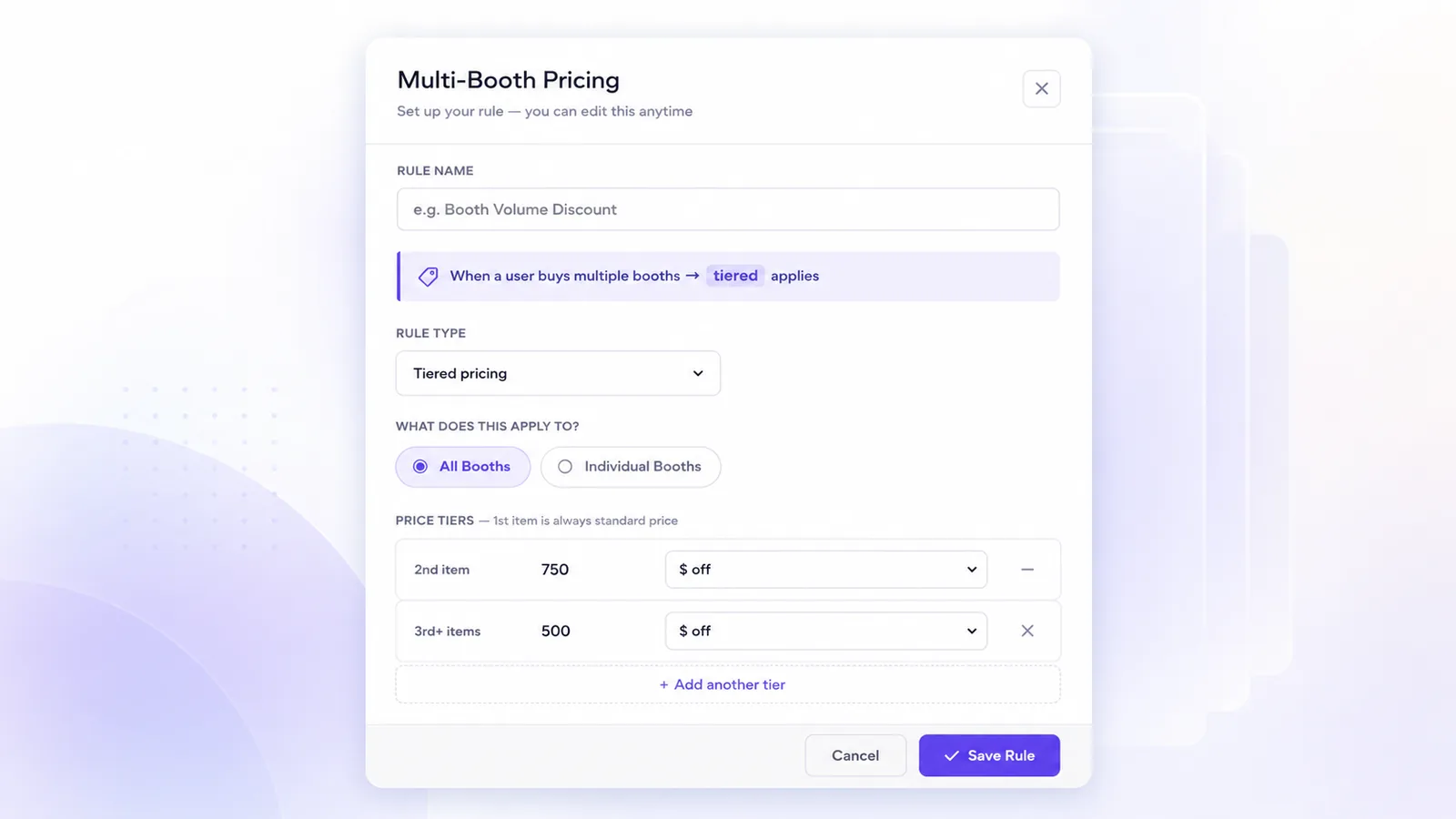
Create pricing adjustments based on booth quantity, purchase volume, or other supported thresholds so buyers can receive the appropriate rate without your sales team manually recalculating the order.
Encourage larger purchases without creating another approval or email workflow.
Buy three booths and the fourth is discounted, automatically.
MEMBER & TIER PRICING
Give different buyers different prices.
Create rates for members, non-members, partners, returning exhibitors, sponsor levels, or other eligible groups so the appropriate buyer sees the appropriate pricing.
Where supported, connect buyer eligibility to your existing membership or account data rather than maintaining a separate pricing spreadsheet.
Uses Novi membership data for member pricing.
DISCOUNT CODES
Run promotions you can actually track
Create promotional codes with defined eligibility, expiration dates, usage limits, and other supported conditions. Keep the discount tied to the actual order so your team can see when and where promotional pricing was used.
Create the offer once instead of honoring discounts from someone’s inbox.
Set a usage cap and an expiry, then forget about it.
PAYMENT-BASED RULES
Configure pricing around your approved payment options.
Where appropriate, apply supported fees, discounts, deposits, or other pricing logic based on the payment workflow a buyer selects.
Build the financial rules your organization permits directly into the purchasing experience.
Payment-based pricing, where permitted.
PREMIUM INVENTORY
Charge more for the spaces buyers value most.
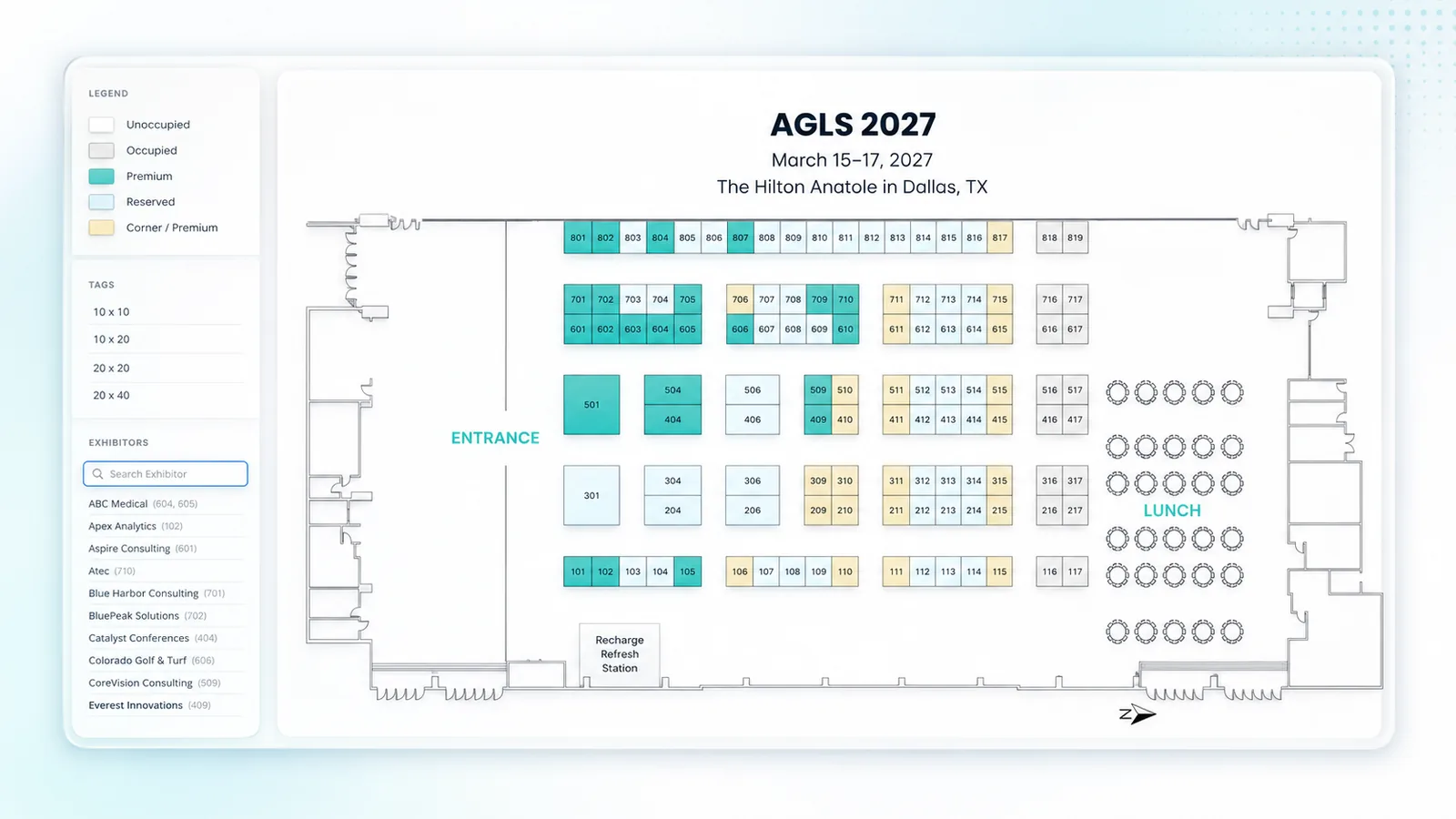
Set different pricing for corners, premium locations, booth sizes, sections, or other categories of inventory so desirable space doesn’t automatically sell for the same price as everything else.
Premium pricing applied
TIME-BASED PRICING
Let pricing change when the calendar does.
Create pricing windows around your sales strategy, such as early rates, standard rates, or later pricing, so buyers receive the appropriate price based on when they purchase.
Stop relying on someone to remember when the next pricing period begins.
Early rate active
ONE PRICING ENGINE
Price every order using the factors that matter to you.
Sophisticated logic runs behind the scenes. The buyer simply sees the price that applies to them.
Location
Where is the inventory?
Premium space, corners, sections, sizes, and other booth attributes.
Buyer
Who’s purchasing?
Member status, account type, partner tier, sponsor level, or other eligibility.
Quantity
How much are they buying?
Booth count, volume, bundles, or other purchase thresholds.
Timing
When are they purchasing?
Early pricing, standard windows, deadlines, and promotional periods.
Offer
What promotion applies?
Codes, special rates, or other defined adjustments.
Applicable Price
The buyer sees one price.
ExpoGenie calculates the price that applies before checkout.
BUYER DATA
Let buyer data inform pricing.
For associations in particular, ExpoGenie can use supported membership and account information to help determine which pricing applies to a buyer, alongside the tools you already run on.
Sync members and exhibitors with your AMS.
Connect your event management workflows.
Push invoices and payments into your accounting.
Accept cards and ACH with automatic reconciliation.
Process payments through your existing gateway.
Connect to thousands of apps with no code.
Sync exhibitor registrations from Swoogo.
Export booth and sponsor data to Sheets.
Push exhibitor leads into your CRM.
Customer Success
Flexible pricing for real-world event sales.
86 booths
CueSports International used ExpoGenie to modernize its booth sales experience.
ExpoGenie has really helped us get out of the stone age.
Yes. Configure different pricing for eligible booth locations, categories, sizes, or other supported inventory attributes so premium space can carry a different rate from standard space.
ExpoGenie can support different pricing for eligible buyer groups, including member and non-member rates. Where an AMS integration supports the necessary membership data, buyer information can help determine which pricing applies.
ExpoGenie can support multiple pricing conditions and adjustments. The specific way overlapping rules interact depends on how your pricing configuration is structured.
Create pricing adjustments based on supported quantity or purchase thresholds so qualifying buyers receive the appropriate pricing without manual calculation.
ExpoGenie can support certain pricing or payment rules based on the buyer’s selected payment workflow where permitted and configured for your organization.
Yes. Pricing can be structured around eligible buyer groups, account types, sponsorship levels, member status, and other supported criteria.
YOUR PRICING STRATEGY, BUILT IN
Start with the pricing rules you already use.
You don’t have to reinvent how your organization sells. Translate the pricing logic you currently manage through rate sheets, spreadsheets, and manual approvals into rules ExpoGenie can apply consistently.
Bring your existing rate structure
Start with your current booth pricing, member rates, discounts, tiers, and promotional policies.
Configure the rules
Define who qualifies, what changes, and when the adjustment applies.
Test before launch
Review buyer scenarios and confirm pricing behavior before opening registration.
See your pricing strategy run itself.
Bring us one of your real pricing scenarios. We’ll show you how ExpoGenie could turn it into an automated rule.